


Website Form Integration
Contact Form 7 to Your CRM
Every Contact Form 7 submission on your WordPress site flows directly into SendSquared as a new contact or lead. No manual exports, no CSV uploads — just real-time data sync that puts website inquiries into your pipeline the moment they happen.
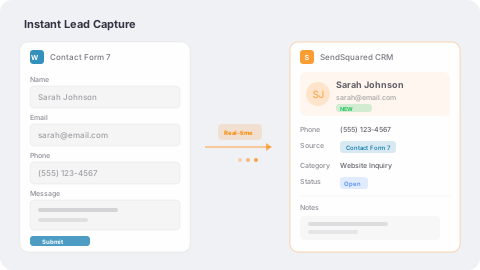
Instant Lead Capture
When a visitor submits a Contact Form 7 form, their data is sent to SendSquared in real time via API. New contacts are created or existing records are updated automatically. Every inquiry hits your pipeline immediately, so your team can follow up while the lead is still warm.
- Real-time form submission to SendSquared API
- Automatic contact creation or record updates
- Custom field mapping for any form field
- Works with any Contact Form 7 form layout
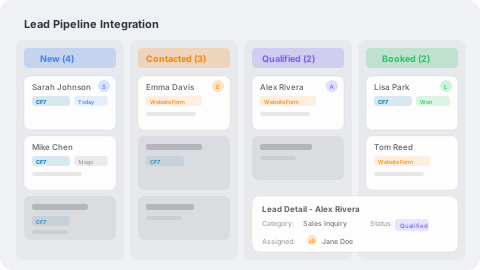
Lead Pipeline Integration
Go beyond basic contact capture with SendSquared's Lead API integration. Form submissions create leads with full pipeline context — category, status, source, and assigned agent. Your sales team sees new website leads in their pipeline instantly with all the context they need to convert.
- Create leads with category, status, and source attribution
- Automatic agent assignment from form submissions
- Full lead-with-contact workflow support
- Pipeline visibility from first website inquiry to booking
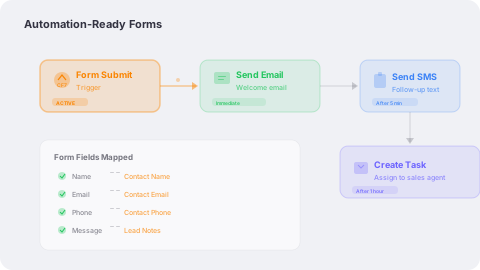
Automation-Ready Forms
Once form data lands in SendSquared, your automations take over. Trigger welcome emails, SMS follow-ups, drip campaigns, and task assignments from every Contact Form 7 submission. Turn passive website forms into active conversion machines.
- Trigger multi-channel automations from form submissions
- Welcome emails and SMS follow-ups sent automatically
- Drip campaigns based on form data and lead source
- Task creation and agent notifications on new inquiries
Frequently Asked Questions
How does Contact Form 7 connect to SendSquared?
A lightweight PHP integration hooks into Contact Form 7 submissions and sends lead and contact data to SendSquared via API in real time.
Can I map custom form fields?
Yes. Any Contact Form 7 field can be mapped to SendSquared contact or lead fields, including custom fields, notes, and tags.
Does this work with the Lead API?
Yes. The integration supports both basic contact creation and advanced lead-with-contact workflows for full pipeline management.
Do I need a developer to set it up?
Basic setup requires adding a PHP snippet to your WordPress site. Our documentation provides copy-paste code with step-by-step instructions.
Ready to Get Started?
See how SendSquared can transform your hospitality operations.
Schedule a Demo