


Website Form Integration
Webflow Forms Meet Your CRM
SendSquared's Webflow integration captures every form submission on your Webflow site and pushes it into your CRM in real time. Custom JavaScript in Webflow's code section connects your forms to your hospitality pipeline — clean data, instant sync, and automated follow-up.
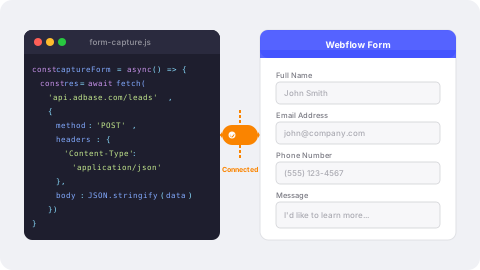
JavaScript-Powered Form Capture
A custom JavaScript snippet in Webflow's custom code section intercepts form submissions and sends data to SendSquared via API. Field mapping, validation, and error handling are built into the integration code — your Webflow forms become direct CRM input points.
- Custom JavaScript integration with Webflow forms
- Client-side validation before API submission
- Field mapping by form element name or ID
- Works alongside or replaces native Webflow form handling
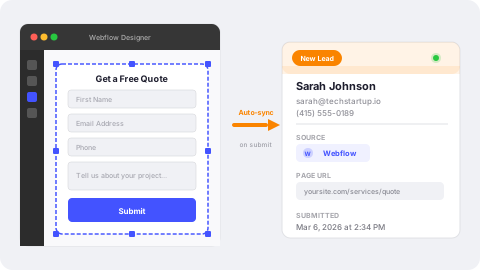
Designer-Friendly Lead Capture
Build pixel-perfect forms in Webflow's visual designer, then connect them to SendSquared with a code snippet. Form submissions create contacts and leads with full attribution — keeping your design workflow intact while powering a real CRM pipeline.
- Design forms visually, connect to CRM with code
- Leads created with source and page attribution
- Custom field mapping for any Webflow form field
- Contact-plus-lead creation in a single workflow
Automate From First Touch
Webflow form data in SendSquared triggers your automation engine. Welcome emails, SMS follow-ups, drip campaigns, and task assignments fire automatically from every form submission. Your beautifully designed Webflow site converts visitors into guests on autopilot.
- Multi-channel automations from every submission
- Instant welcome emails and SMS responses
- Lead nurture campaigns by form and page source
- Internal alerts and agent assignments on new leads

Frequently Asked Questions
How does Webflow connect to SendSquared?
Custom JavaScript added to Webflow's custom code section intercepts form submissions and sends data to SendSquared via API in real time.
Does this work with Webflow's native form handling?
The integration intercepts the form submit event and sends data to SendSquared. You can configure it to also allow Webflow's native submission or replace it entirely.
Can I validate form data before sending?
Yes. The JavaScript integration supports custom validation logic before sending data to SendSquared, ensuring clean data enters your CRM.
Does this work with Webflow CMS collection forms?
The integration works with standard Webflow form elements. CMS-generated forms work as long as you can target the form element with a selector.
Ready to Get Started?
See how SendSquared can transform your hospitality operations.
Schedule a Demo