


Website Form Integration
WPForms, Connected to Your CRM
Every WPForms submission on your WordPress site pushes directly into SendSquared as a new contact or lead. Real-time API sync ensures your team sees every inquiry the moment it happens — no CSV exports, no manual entry, no missed leads.
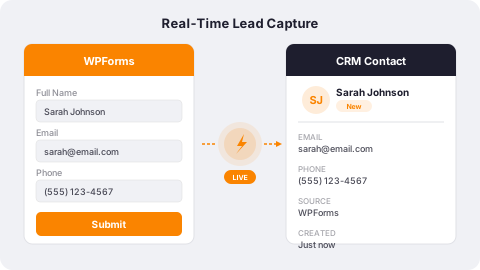
Real-Time Lead Capture
When a visitor submits any WPForms form, their data is sent to SendSquared instantly via API. Field IDs map form inputs to contact and lead properties with precision. New contacts are created, existing records are updated, and your pipeline stays current without lifting a finger.
- Instant form-to-CRM sync via SendSquared API
- Field ID mapping for precise data capture
- Automatic contact deduplication by email address
- Works with WPForms Lite and Pro editions
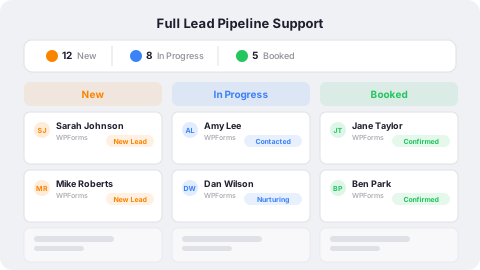
Full Lead Pipeline Support
Go beyond basic contact capture. WPForms submissions can create leads with category, status, source, and agent assignment in SendSquared. Your sales team sees new website inquiries in their pipeline with full context and can follow up immediately.
- Create leads with full pipeline metadata
- Automatic source attribution from form submissions
- Agent assignment and task creation on new leads
- Contact-plus-lead creation in a single workflow
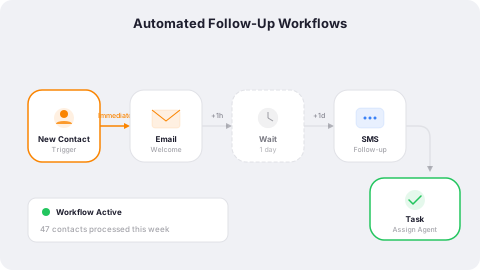
Automated Follow-Up Workflows
Form data in SendSquared triggers your automation engine. Welcome emails, SMS follow-ups, drip campaigns, and internal notifications all fire automatically from WPForms submissions. Every website inquiry gets an instant, personalized response.
- Multi-channel automations from every form submission
- Welcome emails and SMS sent within seconds
- Drip campaigns tailored to inquiry type and source
- Internal alerts and task assignments for your team
Frequently Asked Questions
How does WPForms integrate with SendSquared?
A PHP hook on the wpforms_process_complete action sends form data to SendSquared via API in real time when a visitor submits any WPForms form.
Does this work with WPForms Lite?
Yes. The API integration works with both WPForms Lite and Pro versions, using field IDs to map data to SendSquared.
Can I map custom fields from WPForms?
Yes. Any WPForms field can be mapped to SendSquared contact or lead properties using the field ID system.
Will existing contacts be updated or duplicated?
SendSquared matches on email address. Existing contacts are updated with new data, and new contacts are created when no match is found.
Ready to Get Started?
See how SendSquared can transform your hospitality operations.
Schedule a Demo